Monitor Your Personal Performance
Your Agent Dashboard shows you everything about your learning and development at a glance. It's where you'll spot trends, identify improvement opportunities, and track your progress over time.
We know agents want to understand their performance and grow their skills. That's where your Agent Dashboard comes in. We provide the tools you need to track your progress, compare your performance, and identify specific areas where you can improve and excel.
What is Your Dashboard? Your Agent Dashboard is your personal performance monitoring centre, offering individual metrics, team comparisons, trend analysis, and development insights to help you track your growth and identify improvement opportunities.
What You Can Achieve
Your dashboard is your personal performance hub. It helps you stay on track, grow your skills, and celebrate your progress. With it, you can:
- Track your learning progress and see how you’re improving over time
- Spot trends and patterns in your own performance
- Compare your results with your team to understand where you stand
- Identify areas for improvement and focus on growth opportunities
- Set personal development goals and plan your learning path
- Celebrate achievements as you reach milestones and build new skills
Understanding Your Dashboard
Your agent dashboard gives you a complete view of your individual performance metrics and the average agent performance in your team, department or organisation. Everything is designed to help you understand your current standing and identify areas for growth across the different categories.
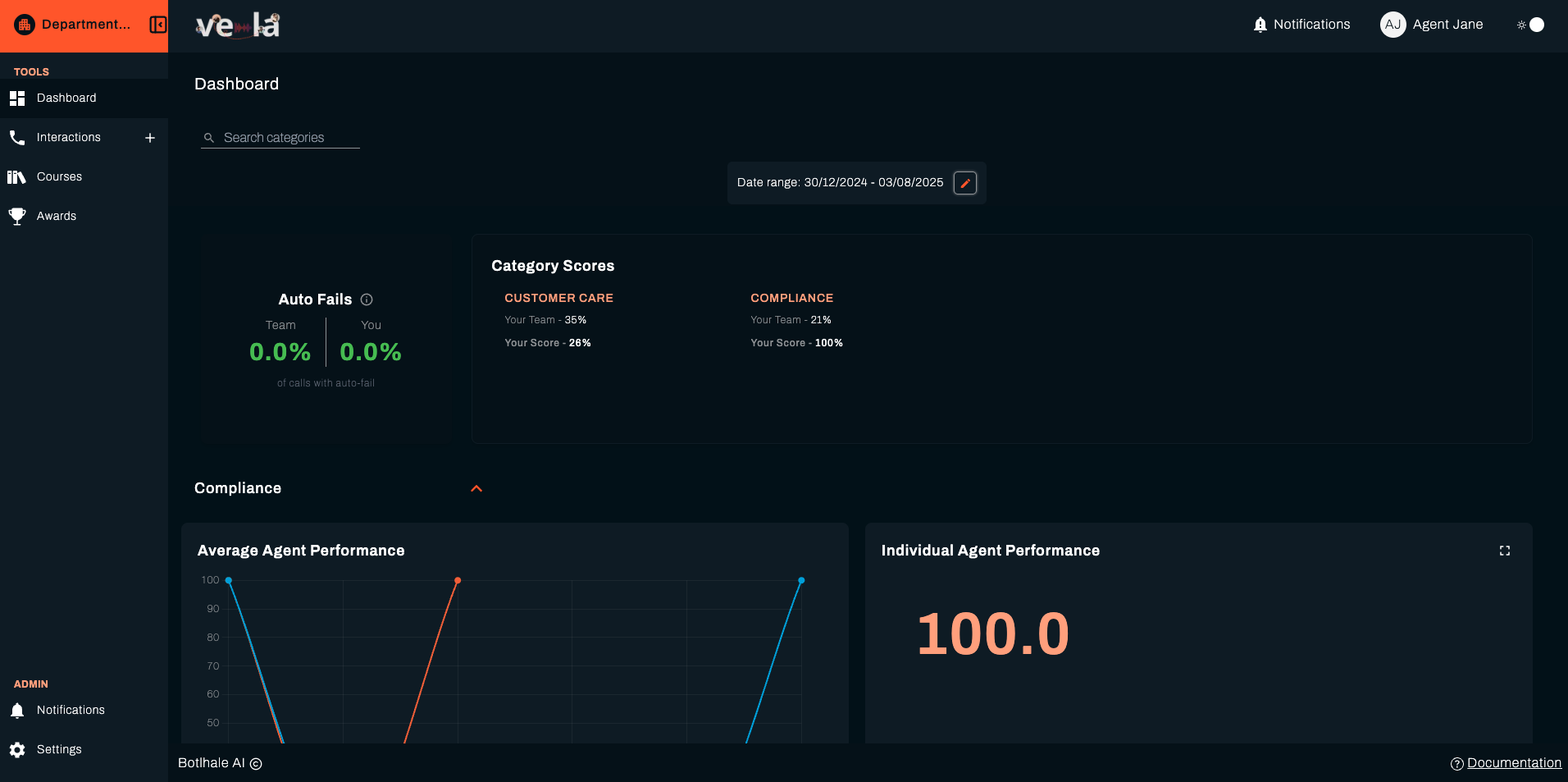
💡 Tip: Regular dashboard reviews help you stay aware of your performance trends and catch improvement opportunities early.
Dashboard Metrics Explained
Category Scores
Track your individual score in multiple categories versus your team score. This assists in your ability to identify areas of improvement.
Why this matters: Understanding how you compare to your team helps you identify your strengths and areas where you can grow to become a top performer.
Auto Fails
- Auto-Fails: Auto Fails represent critical errors that automatically fail an evaluation. This percentage shows what portion of calls had at least one auto-fail criterion.
💡 Pro Tip: Focus on reducing auto-fails first, as these represent critical areas that need immediate attention and can significantly impact your overall performance.
Performance Charts
View your performance trends over a specified date range. Use the Date range filter to zone in on specific dates you are interested in to analyse:
- Average Agent Performance trends
- Your Individual Agent Performance
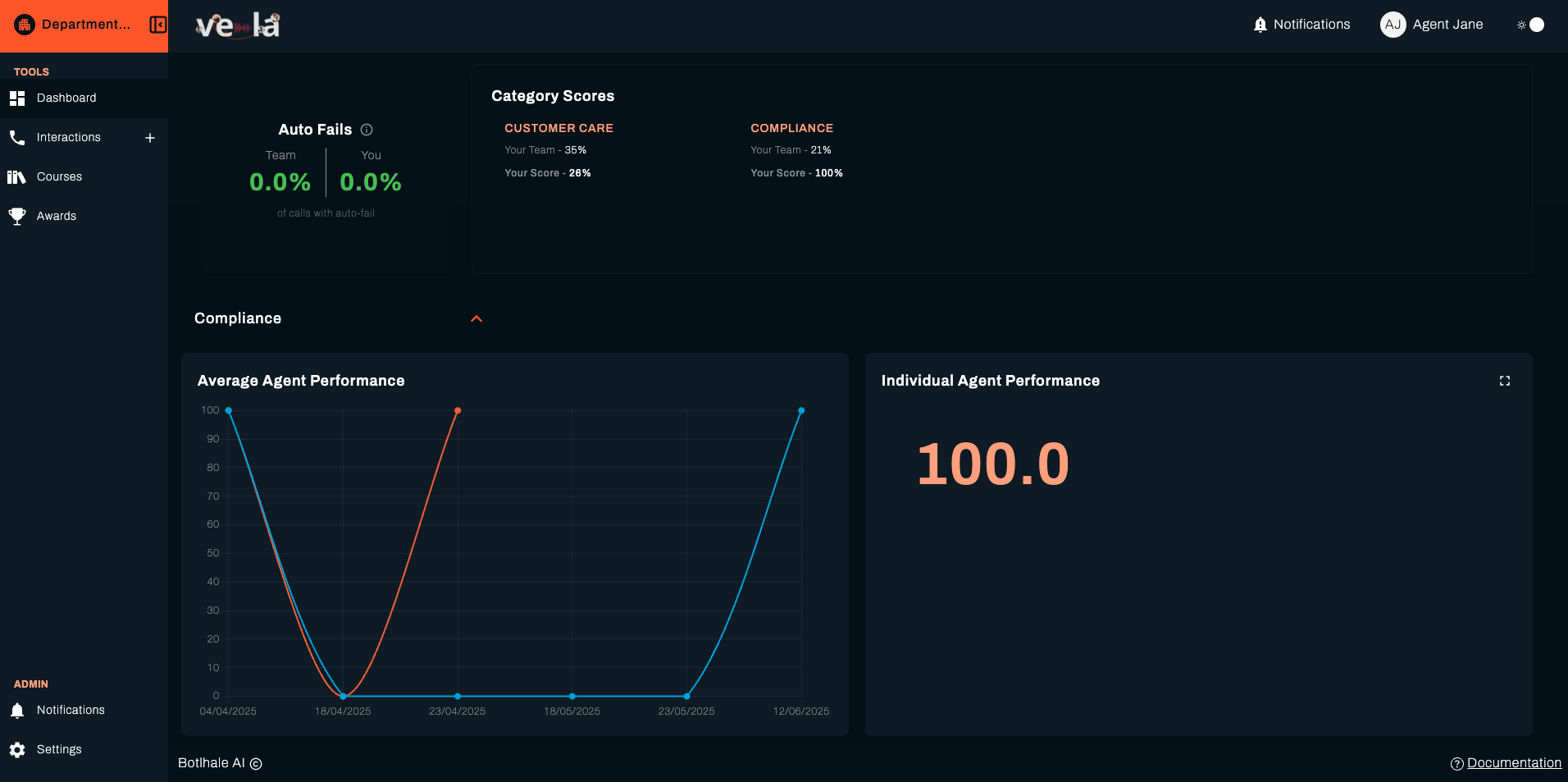
Why this matters: Trend analysis helps you understand whether your performance is improving, staying consistent, or declining over time, allowing you to adjust your development focus accordingly.
Using Your Dashboard for Development
Setting Personal Goals
Use your dashboard data to set realistic and challenging development goals:
- Identify Your Weakest Areas: Look for categories where your score is below team average
- Set Specific Targets: Aim to improve by a specific percentage or reach team average
- Track Progress: Monitor your improvement over time using the trend charts
- Celebrate Success: Recognise when you achieve your goals and set new ones
💡 Pro Tip: Start with small, achievable goals and gradually increase the challenge as you improve.
Planning Your Development
Use your dashboard insights to plan your learning and development:
- Focus on Low-Scoring Areas: Prioritise training in categories where you're below average
- Build on Strengths: Use your high-scoring areas as confidence builders
- Seek Feedback: Use your performance data to guide conversations with your team lead
- Track Improvement: Monitor how your scores change after training or coaching
Why this matters: Data-driven development planning ensures you focus your efforts on areas that will have the biggest impact on your performance and career growth.
What's Next?
Now that you understand your dashboard, explore these related guides:
- 📚 Track Your Courses - Monitor your learning progress
- 🏆 View Your Awards - Celebrate your achievements
- 📞 Review Your Interactions - Analyse your performance
- ⚙️ Manage Your Settings - Customise your portal experience
Need Help?
Stuck with your dashboard? We're here to help!
- 📖 Course Tracking Guide - Learn about monitoring your learning progress
- 📖 Awards Guide - Understand your recognition achievements
- 📖 Interaction Analysis Guide - Review your performance insights
Still need assistance?
- Email us: support@botlhale.ai
Was This Guide Helpful?
We're constantly improving our documentation. Let us know how we can make this guide better for you and your team.