Getting Started - A Tour of the Agent Portal
Welcome to the Vela Coaching Portal! This guide will help you start tracking your performance and managing your professional development immediately.
We know agents want to excel in their roles and grow their careers. That's where the Vela Coaching Portal comes in. We provide the tools you need to track your performance, access training, and celebrate your achievements.
What is the Vela Coaching Portal? The Vela Coaching Portal helps you track your performance, access training courses, celebrate your achievements, and assess your own development to help you grow and succeed in your role.
What You'll Achieve
By the end of this guide, you'll be able to:
- Track your performance with detailed analytics and insights
- Access training courses to develop new skills and improve existing ones
- Review your interactions to understand your strengths and areas for growth
- Celebrate achievements with awards and recognition
- Manage your development through structured learning paths
We've made this guide as straightforward as possible because we understand you have calls to handle and skills to develop.
Understanding the Vela Interface
Before we dive into the features, let's quickly familiarise you with the Vela Coaching Portal interface:
Left Navigation
The left navigation bar is your main navigation hub in the Coaching Portal. You'll find:
- Dashboard - Your personal performance overview with customisable metrics
- Courses - Access your training materials and track progress
- Awards - View your achievements and recognition
- Interactions - Review your calls and chats with detailed analysis
- Admin - Manage your account settings, preferences, and notifications
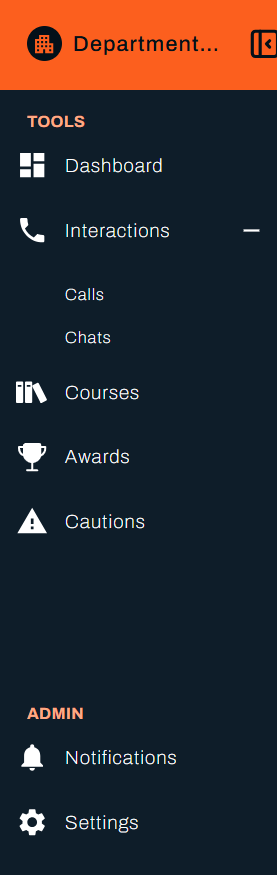
💡 Tip: The left navigation provides easy access to all sections of the Coaching Portal, making it simple to switch between different areas of your learning and development workflow.
Quick Setup Checklist
Step 1: Explore Your Dashboard
Goal: Understand your current performance and identify growth opportunities
Your dashboard is your personal command centre. It shows you everything you need to know about your performance at a glance.
- Review the Dashboard to see your performance metrics
- Use the date picker to analyse specific time periods
- Compare your scores to team and organisation averages
- Identify your strengths and areas for improvement
📊 Dashboard guide - Learn about all dashboard features and metrics
Why this matters: Your dashboard helps you understand where you excel and where you can grow.
Step 2: Review Your Interactions
Goal: Learn from your customer conversations and identify improvement areas
This is where you'll dive deep into your performance and understand what you're doing well and where you can improve.
- Navigate to "Interactions" to see all your calls and chats
- Use filters to find specific interactions (by date, score, topic)
- Click on any interaction to review in detail:
- Listen to call audio and read transcripts
- Review Smart Detector insights for performance analysis
- Identify specific improvement opportunities
📞 Interactions guide - Learn how to review and learn from your interactions
Why this matters: Detailed interaction reviews help you understand your performance patterns and identify specific areas for growth.
Step 3: Access Your Training
Goal: Complete assigned courses and develop new skills
Your courses are designed to help you grow and improve in specific areas identified through your performance analysis.
- Go to "Courses" to see all your assigned training
- Check course status (Not Started, In Progress, Completed)
- Start a course by clicking on it
- Complete quizzes to test your understanding
- Review your scores and feedback
📚 Courses guide - Learn about course features and how to get the most from your learning
Why this matters: Structured training helps you develop the skills you need to excel in your role.
Step 4: Celebrate Your Achievements
Goal: Recognise your progress and stay motivated
Your awards represent recognition for your hard work and dedication to excellence.
- Check "Awards" to see your recognitions
- Filter awards by date or type to reflect on your accomplishments
- Download certificates for your personal records
- Use achievements as motivation for continued growth
🏆Awards guide - Learn about your awards and how to use them for career development
Why this matters: Recognition keeps you motivated and provides evidence of your professional growth.
Next Steps
Now that you're familiar with the basics, here are some next steps to improve your success:
For New Agents
- Start by exploring your dashboard to understand your current performance
- Complete any assigned introductory courses to build foundational skills
- Review recent interactions to identify immediate improvement opportunities
For Experienced Agents
- Use advanced filtering to analyse specific performance areas
- Take advantage of all available training to develop specialised skills
- Build a portfolio of achievements through awards and certificates
For Career Development
- Regularly review your performance trends to identify growth patterns
- Complete advanced courses to prepare for career advancement
- Use your awards and achievements in performance reviews and applications
💡 Pro Tip: The Vela Coaching Portal is designed to support your growth journey. Use it regularly to track your progress and celebrate your achievements.
🎉 You're All Set!
Congratulations! You've just completed your first steps with the Vela Coaching Portal. You're now ready to improve your professional development with data-driven insights and structured learning tools. The portal provides everything you need to grow and excel in your role.
Agents face unique challenges - managing performance, developing skills, and maintaining motivation. The Vela Coaching Portal helps you see what's really happening so you can make informed decisions about your development.
You've just discovered the capabilities that will help you work better!
What's Next?
Daily Operations
- Monitor your dashboard - Track daily performance and trends
- Review your interactions - Stay on top of your performance
- Check your courses - Complete assigned training
Professional Development
- Access training materials - Develop specific skills and knowledge
- Celebrate achievements - Track your recognition and awards
- Manage your account - Keep your profile updated and manage settings
Advanced Features
- Customise your view - Tailor the portal to your preferences and manage notifications
- Track your progress - Monitor your learning journey
- Build your portfolio - Collect certificates and achievements
💡 Pro Tip: Use the left navigation in the Vela Coaching Portal to quickly access any section. Each section has its own dedicated documentation that you can reference while working in the platform.
Need Help?
Don't worry! We're here to help! Here's how to get support:
- 📧 Contact Support: support@botlhale.ai
- 🎥 Video Tutorials: Available on the homepage
Was This Guide Helpful?
We're constantly improving our documentation based on your feedback. Let us know how this guide worked for you:
Did this guide help you get started with the Vela Coaching Portal?
- ✅ Yes - I was able to set up the portal successfully
- ❌ No - I need more help
What could we improve?
- More detailed steps
- Better screenshots
- Additional examples
- Different organisation
Send your feedback to: support@botlhale.ai