Customise Your Coaching Portal Experience
Tailor your coaching portal to match your team's needs and your management style. Configure evaluation settings, notification preferences, and dashboard options to improve your workflow.
Team leads want to work efficiently and focus on what matters most. The Preferences section gives you tools to customise your portal experience, simplify your workflow, and make sure you get the right information when you need it.
What are Preferences? The Preferences section lets you customise how the portal works for you. You can set evaluation settings, manage notifications, configure your dashboard, and adjust your workflow to work more efficiently.
What You Can Achieve
Customise settings that improve your coaching effectiveness:
| Evaluation Control | Workflow Optimisation | Team Management |
|---|---|---|
| Set evaluation scope and frequency | Configure notification preferences | Control agent access permissions |
| Define course completion criteria | Personalise dashboard layouts | Manage team visibility settings |
| Improve coaching cycles | Simplify administrative tasks | Build trust through transparency |
Understanding the Preferences Interface
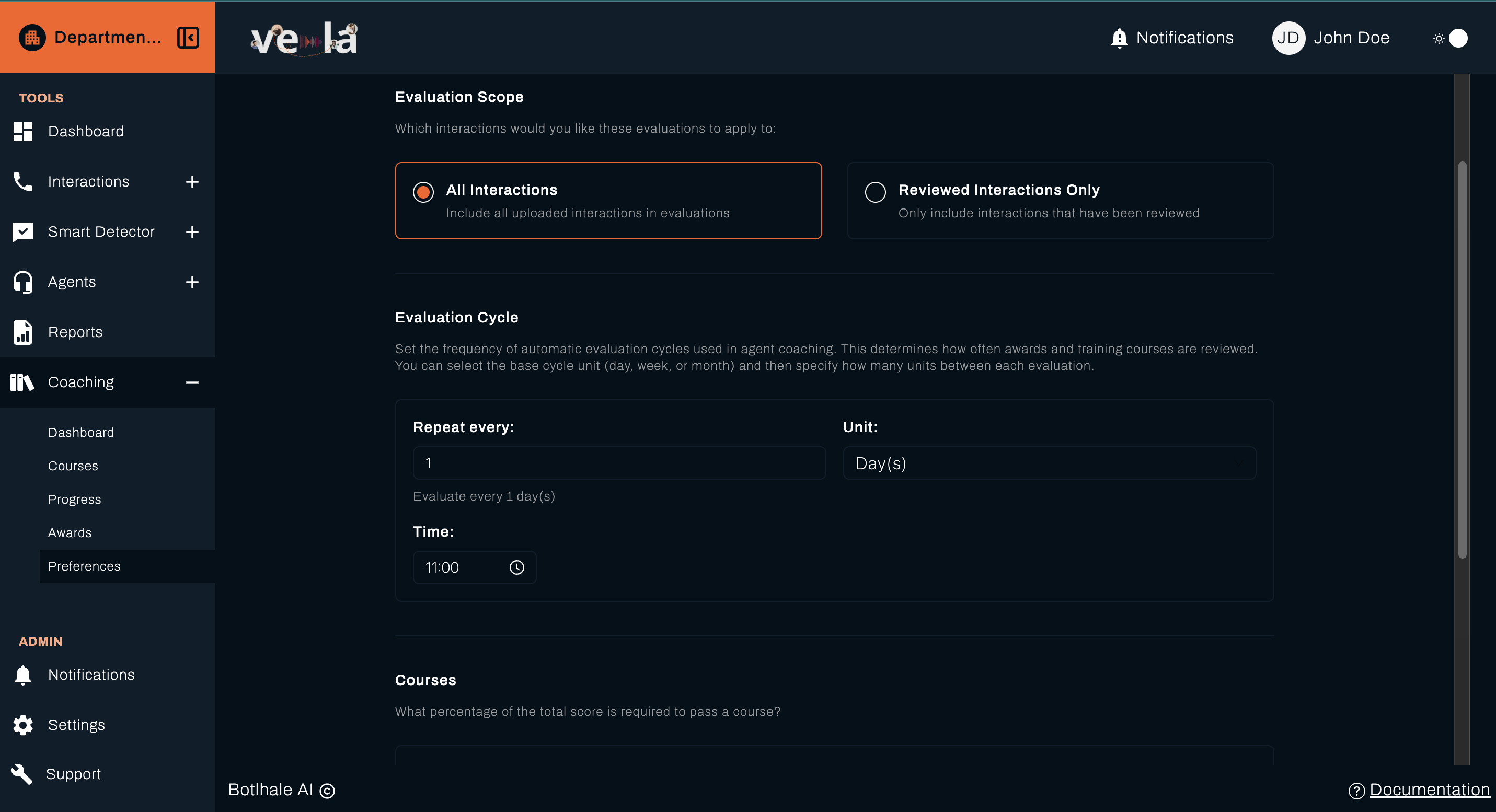
The Preferences section allows you to tailor the portal to your specific needs as a team lead, ensuring you receive the right information at the right time while maintaining an efficient workspace.
💡 Tip: Take time to configure your preferences properly - the right settings can significantly improve your daily workflow and coaching effectiveness.
Evaluation Scope Configuration
Configure which interactions should be included in your evaluation processes to ensure you're analysing the most relevant data.
Interaction Selection
Choose which interactions you want these evaluations to apply to:
-
All Interactions: Include all uploaded interactions in evaluations
- Provides complete coverage of agent performance
- Ensures no interactions are missed in assessments
- Gives complete picture of team performance
-
Reviewed Interactions Only: Only include interactions that have been reviewed
- Focuses on quality-controlled data
- Ensures evaluations are based on verified interactions
- Provides more targeted assessment approach
Why this matters: The right evaluation scope ensures you're making decisions based on the most relevant and reliable data for your team's needs.
This setting determines the scope of data used for:
- Performance analytics and reporting
- Agent coaching insights
- Team performance comparisons
- Award and recognition calculations
Evaluation Cycle Settings
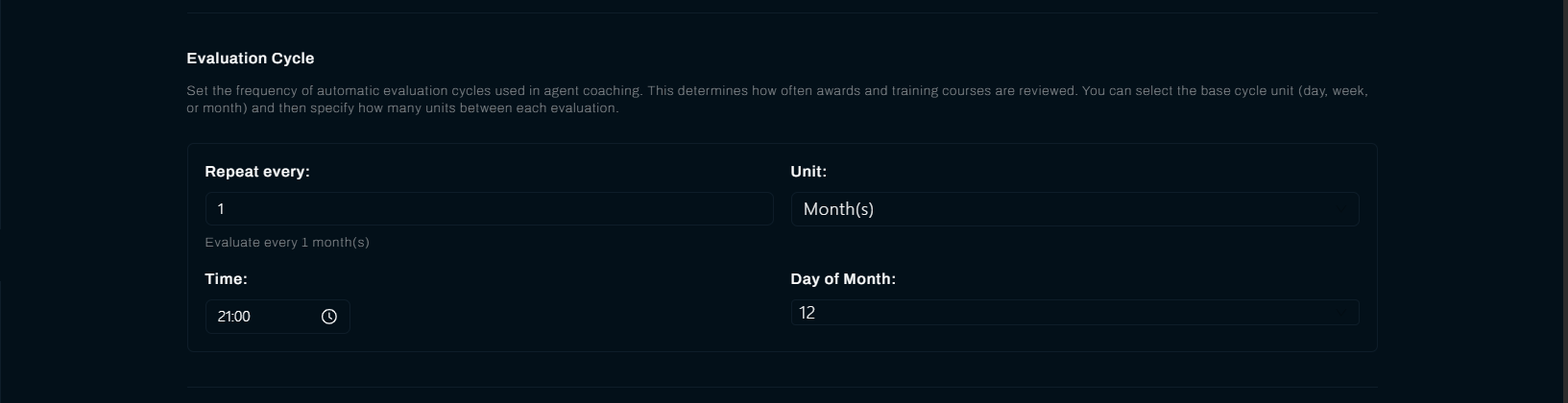
Set the frequency of automatic evaluation cycles used in agent coaching. This determines how often awards and training courses are reviewed.
Why this matters: Regular evaluation cycles help you maintain consistent coaching standards and ensure timely recognition of achievements.
Cycle Configuration
Repeat every: Set the frequency interval (1-365)
Unit: Select the base cycle unit
- Day(s): For daily evaluation cycles
- Week(s): For weekly evaluation cycles
- Month(s): For monthly evaluation cycles
Time: Set the specific time when evaluations should run (e.g., 11:00)
Example Configurations
-
Daily Reviews: Repeat every 1 day(s) at 11:00
- Best for high-volume operations
- Provides immediate feedback opportunities
- Allows quick coaching interventions
-
Weekly Assessments: Repeat every 1 week(s) at 11:00
- Balanced approach for most teams
- Allows time for performance patterns to emerge
- Manageable review workload
-
Monthly Evaluations: Repeat every 1 month(s) at 11:00
- Suitable for long-term performance tracking
- Focuses on significant trends and improvements
- Reduces administrative overhead
💡 Pro Tip: Choose evaluation frequency based on your team size and operational needs - smaller teams might benefit from more frequent evaluations, while larger teams might prefer weekly or monthly cycles.
Course Settings Configuration
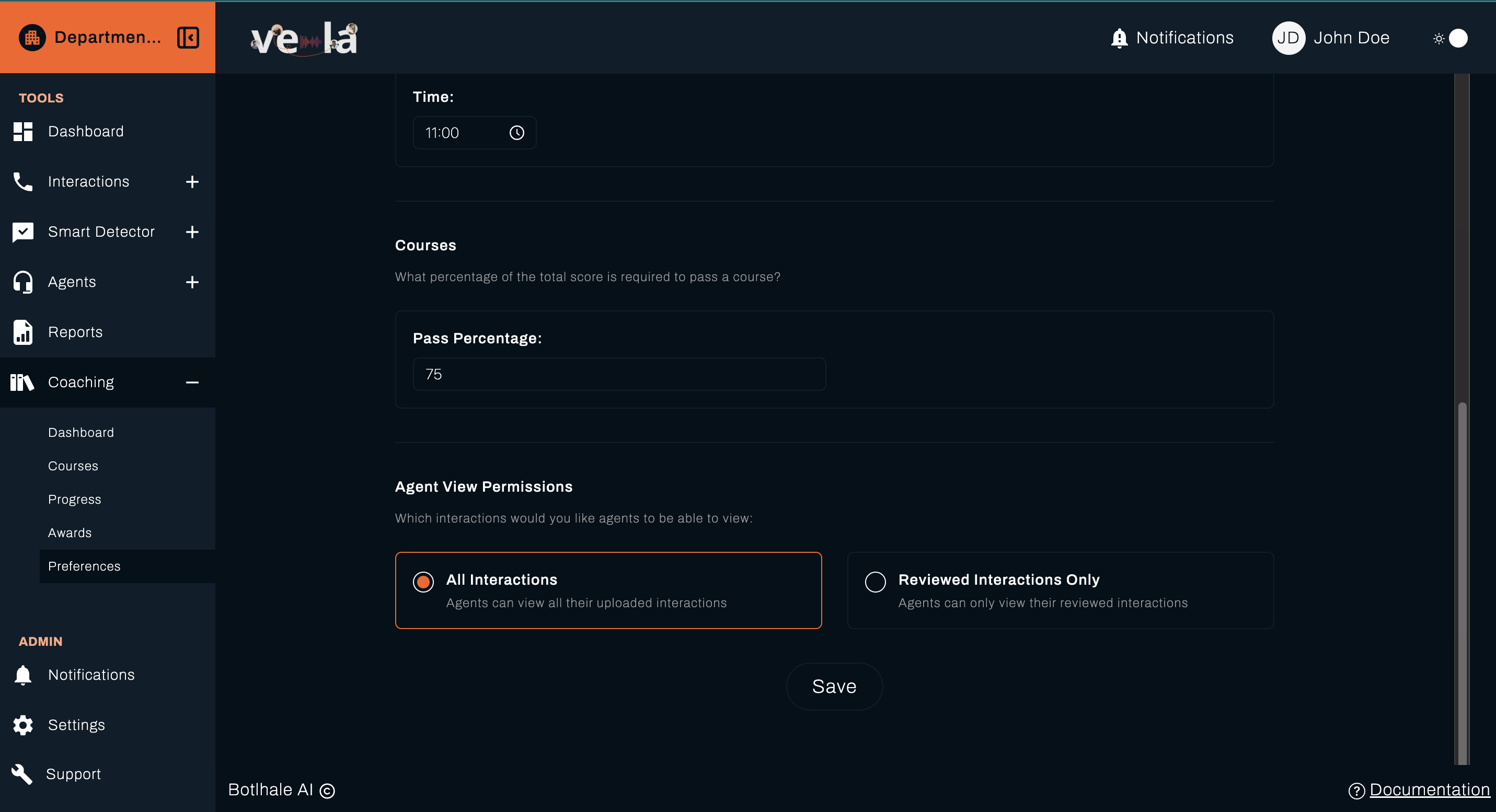
Configure course completion requirements and passing criteria for your team's training programmes to ensure consistent learning standards.
Why this matters: Clear completion criteria help agents understand expectations and ensure training programmes deliver measurable skill improvements.
Pass Percentage
What percentage of the total score is required to pass a course?
Set the minimum score threshold that agents must achieve to successfully complete a course. This ensures consistent learning standards across your team.
💡 Tip: Consider your team's current skill levels when setting pass percentages - aim for challenging but achievable standards that motivate improvement.
Agent View Permissions
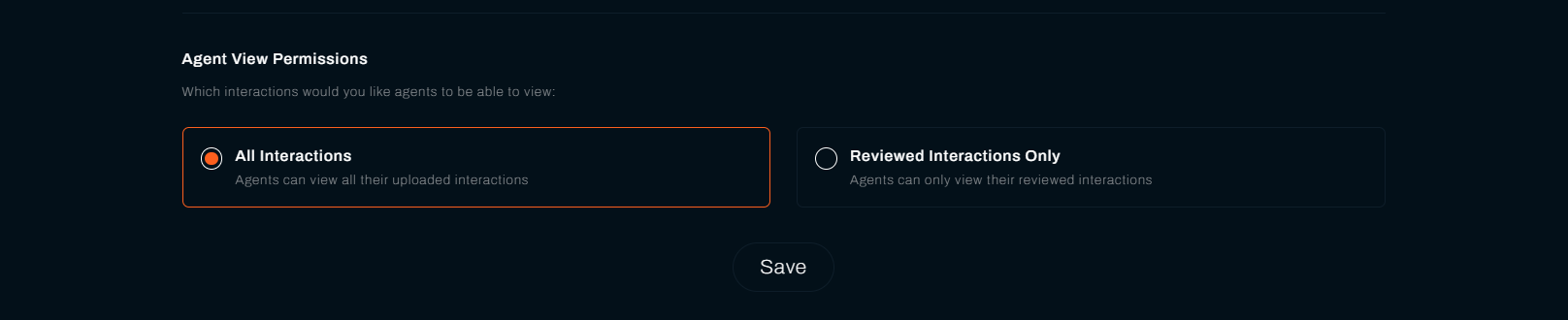
Control what interaction data agents can access in their personal portals.
Interaction Visibility
Which interactions would you like agents to be able to view:
-
All Interactions: Agents can view all their uploaded interactions
- Provides complete transparency
- Allows thorough self-review
- Supports independent learning and improvement
- Builds trust through open access
-
Reviewed Interactions Only: Agents can only view their reviewed interactions
- Ensures agents see quality-controlled feedback
- Focuses attention on professionally assessed interactions
- Maintains quality standards in self-review
- Prevents confusion from unprocessed data
Configuration Best Practices
Evaluation Scope Recommendations
- High-Volume Centres: Consider "Reviewed Interactions Only" to manage data quality
- Quality-Focused Teams: Use "All Interactions" for complete coverage
- Training Environments: Start with "Reviewed Interactions Only" for guided learning
Evaluation Cycle Guidelines
- New Teams: Begin with weekly cycles for close monitoring
- Established Teams: Monthly cycles may be sufficient for stable performance
- Performance Issues: Increase frequency to daily for intensive coaching periods
Course Pass Rate Considerations
- Technical Training: Higher pass rates (80-85%) ensure competency
- Soft Skills Training: Standard rates (70-75%) allow for varied learning styles
- Compliance Training: Very high rates (90%+) ensure critical knowledge retention
Agent Permission Strategy
- Trust-Building Phase: Grant "All Interactions" access to encourage ownership
- Quality Control Phase: Use "Reviewed Interactions Only" for consistent messaging
- Performance Improvement: Adjust based on individual agent needs and maturity
Saving Your Preferences
After configuring your settings:
- Review all selected options
- Ensure evaluation cycles align with your coaching schedule
- Verify course pass rates match your quality standards
- Confirm agent permissions support your management approach
- Click Save to apply all changes

⚠️ Important: Preference changes take effect immediately and will impact ongoing evaluations and agent access. Consider communicating significant changes to your team.
What's Next?
Now that you've customised your portal experience, explore these related guides:
- 📊 Monitor Your Dashboard - See how your preferences affect your dashboard view
- 📚 Manage Training Courses - Create courses that align with your evaluation settings
- 🏆 Recognise Excellence - Set up awards that work with your evaluation cycles
- 📈 Track Progress - Monitor progress using your customised criteria
Need Help?
Stuck with preference configuration? We're here to help!
- 📖 Dashboard Guide - Learn about customising your dashboard view
- 📖 Course Management Guide - Create courses that work with your settings
- 📖 Awards Guide - Set up recognition programmes
Still need assistance?
- Email us: support@botlhale.ai
Was This Guide Helpful?
We're constantly improving our documentation. Let us know how we can make this guide better for you and your team.
Improve Your Experience: Regular review of your preferences ensures the portal continues to meet your evolving needs as a team lead. These settings directly impact coaching effectiveness and team development outcomes.